
Quickstart
Get a Clavis instance running and store your first secret in about five minutes.
1. Run the server
Single binary:
make build
./bin/clavis server
or with Docker:
docker run -d --name clavis --restart unless-stopped \
  -p 8080:8080 -v clavis-data:/data \
  ghcr.io/dumhouse/clavis:latest
-p 8080:8080publishes Clavis on port 8080 of your machine, so the address is http://localhost:8080, the same address the setup link in the log uses. For port 80 or HTTPS, use the install wizard.--restart unless-stoppedbrings it back after a crash or a reboot.-v clavis-data:/datakeeps the database and the root key across restarts and upgrades.
Running Clavis on another machine?
Use the install wizard. It asks where Clavis runs and writes a compose file with HTTPS set up (a self-signed certificate for a home lab, or Let's Encrypt for a domain). Browsers only keep the sign-in cookie over HTTPS or on localhost; see HTTPS and certificates.
With Docker the data lives in the clavis-data volume; with the binary it is in ./data (SQLite database and the root key). The root key is created with 0600 permissions. Back it up separately from database backups — without it the ciphertexts cannot be decrypted.
2. Claim the instance
A fresh server has to be claimed with a one-time setup token, so that whoever reaches it first cannot take it over. The easiest way: the server log prints a setup link with the token built in.
docker logs clavis 2>&1 | grep setup_urlOpen that link. Or open http://localhost:8080/setup and paste the token, which you can print at any time while setup is open:
docker exec clavis clavis setup-token        # Docker
docker compose exec clavis clavis setup-token # Docker Compose
clavis setup-token                            # binary, from the server's directory
On a remote server, run it over SSH: ssh user@host docker exec clavis clavis setup-token.
Create your owner account (name, email, 12+ character password). After you sign in, a short welcome flow asks for:
- your organization's name,
- your first project and what it is built with (Node.js, Python, Go, Ruby, PHP, Java, .NET, Rust, Docker Compose, or anything else),
- the commands to connect your app, for your operating system and stack.
You can skip the project step and create projects later.
Setup closes permanently once the owner exists. The token file is deleted.
To skip the token step entirely, choose the token yourself when you start the server (CLAVIS_SETUP_TOKEN, at least 24 characters) and optionally lock the owner email (CLAVIS_SETUP_OWNER_EMAIL). The install wizard does this for you.
3. Store a secret
In the web app, open your project, click Add secret, and enter a key such as STRIPE_SECRET_KEY and its value. The value is encrypted with a project key before it reaches SQLite. Revealing it writes an audit event.
Secrets are versioned automatically. Updating creates a new immutable version; rollback creates another version rather than rewriting history.
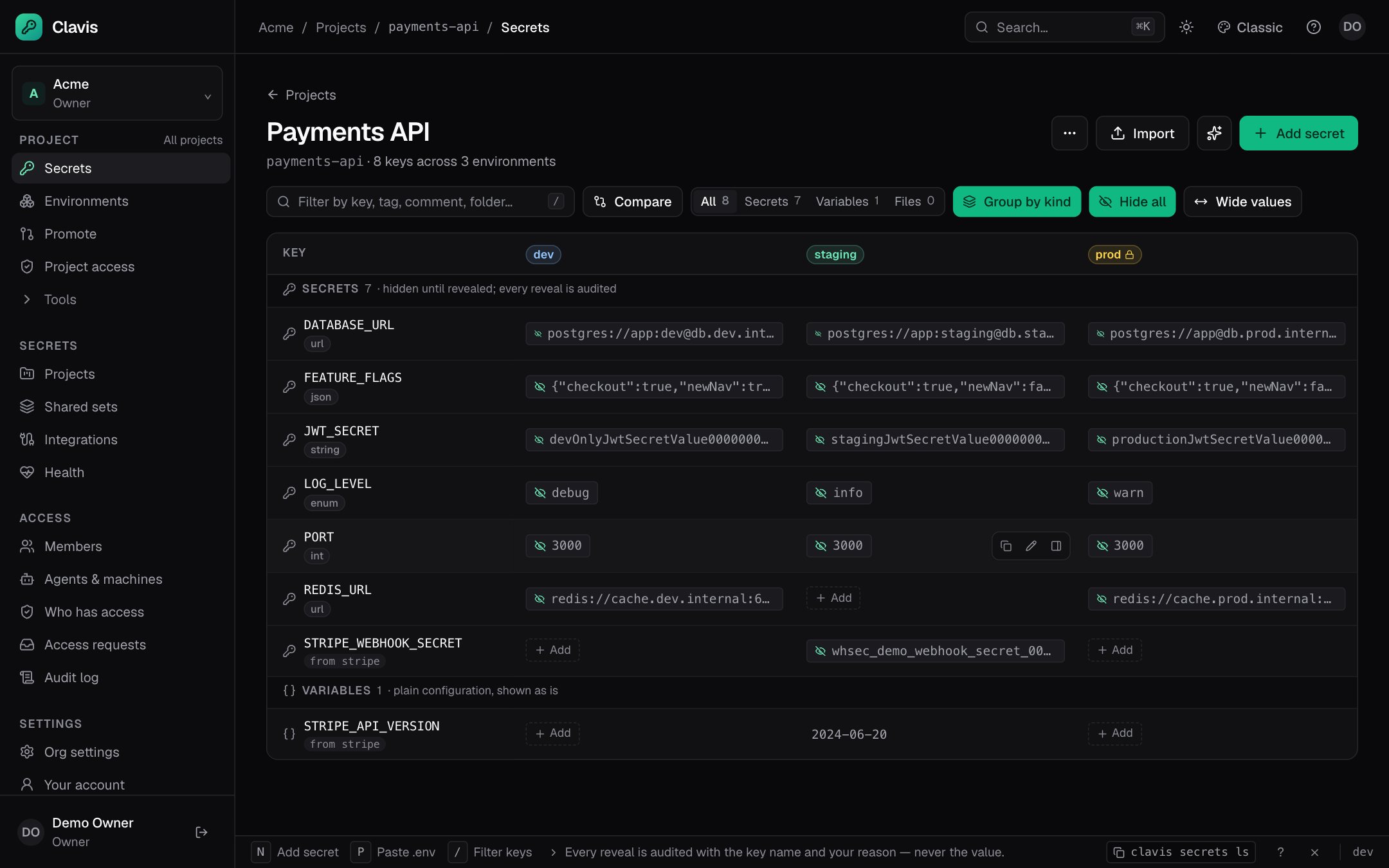
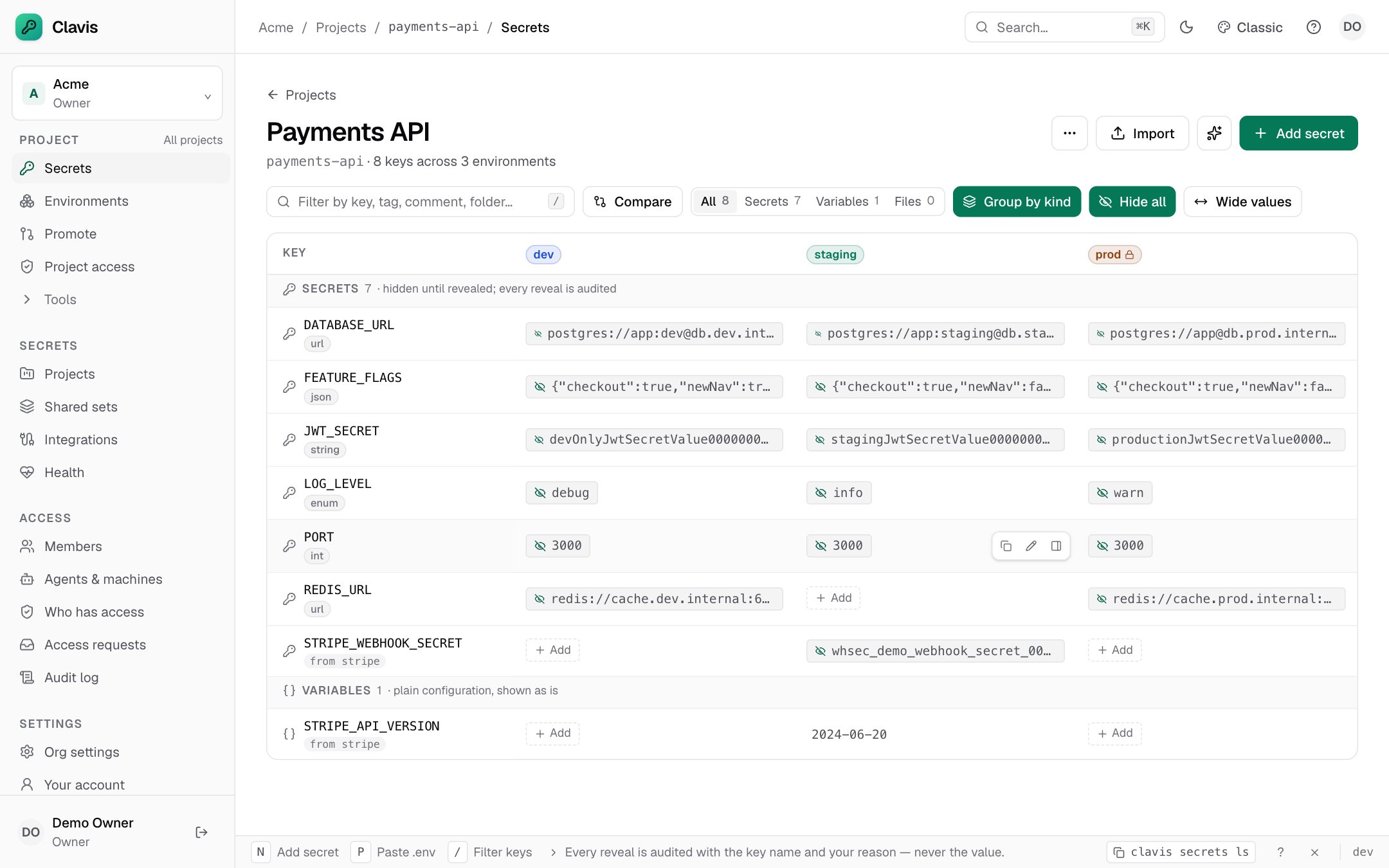
More screens in the screenshot tour.
4. Use the API
The API is versioned under /api/v1 and documented by the OpenAPI 3.1 document at /api/v1/openapi.json.
Browsers use an HttpOnly session cookie plus a double-submit CSRF token. A cookie-based script looks like this:
BASE=http://localhost   # http://localhost:8080 when you run the binary

# Sign in; -c stores the session and CSRF cookies.
curl -sS -c cookies.txt -H 'Content-Type: application/json' \
  -d '{"email":"owner@example.com","password":"correct horse battery staple"}' \
  "$BASE/api/v1/auth/login"

CSRF=$(awk '$6 ~ /clavis_csrf$/ {print $7}' cookies.txt)

# Create a secret (CSRF header required for unsafe methods).
curl -sS -b cookies.txt -H "X-CSRF-Token: $CSRF" -H 'Content-Type: application/json' \
  -d '{"key":"DATABASE_URL","value":"postgres://…"}' \
  "$BASE/api/v1/orgs/acme/projects/web-app/environments/dev/secrets"

# List key names without values.
curl -sS -b cookies.txt \
  "$BASE/api/v1/orgs/acme/projects/web-app/environments/dev/secrets"
Machine tokens and workload identity are available; see ci.md for CI setup and agents.md for agent identities.
5. Run with secrets
# Sign in with the browser device flow; the token is stored in the OS keychain.
clavis login --server http://localhost   # :8080 for the binary

# Link this repository to a project and choose a default environment.
clavis init

# Read and write secrets.
clavis secrets ls
clavis secrets set DATABASE_URL
clavis secrets get DATABASE_URL
clavis run npm run dev
clavis run injects secrets as environment variables and masks values (and their base64/URL-encoded forms) in stdout/stderr. Clavis flags go before your command and -- is optional: clavis run rails s -p 3001 passes -p 3001 to Rails. clavis init also saves how to start your app as run: in .clavis.yaml when it recognizes the project, so a plain clavis run starts it. See clavis run and .clavis.yaml. Masking is a convenience, not a boundary: prefer short-lived dynamic credentials for agents.
That is all local setup needs: clavis login stores the session token in the OS keychain, and clavis init commits the project context to .clavis.yaml.
In CI, there is no browser to complete the login. Create a machine identity under Agents & machines, scope it to a project and environment, and set its clv_mt_… token as CLAVIS_TOKEN in the CI secret store. If the repository commits .clavis.yaml, that token is the only variable a job needs (plus CLAVIS_SERVER when the instance is not on localhost). See ci.md for GitHub Actions, GitLab, explicit scope variables, and workload OIDC.
Docker and Compose
# Docker's env-file format (comments, no export prefix)
clavis export --format docker > .env
docker compose up --env-file .env# compose.yaml
services:
app:
image: my-app
env_file: .envFile secrets can be mounted instead of injected as environment variables:
clavis run --mount ./start.sh # FILE_KEY points at a 0600 temp fileInvite a teammate
As an Owner or Admin, open Members → Invite member, choose a role and expiry, and copy the single-use link. Invites can be restricted to an email address. The same operation is available through the API.
Postgres
database:
  driver: postgres
  dsn: postgres://clavis:secret@db:5432/clavis?sslmode=require
Postgres runs the same migrations, queries, sessions, audit chain, and workers as SQLite. Multiple replicas are supported: SSE events fan out over Postgres LISTEN/NOTIFY, and job workers claim with SKIP LOCKED. Split process roles with clavis server --role=api and clavis server --role=worker.
Server configuration
These configure the server binary; environment variables override clavis.yaml. Do not confuse CLAVIS_SERVER_ADDR (listen address) with CLAVIS_SERVER (the CLI's target). CLI context variables are covered in ci.md and cli.md.
| Variable | Default | Purpose |
|---|---|---|
CLAVIS_SERVER_ADDR | :8080 | Listen address |
CLAVIS_SERVER_BASE_URL | derived | Public URL used in docs and cookies |
CLAVIS_DATA_DIR | ./data | Data directory for defaults |
CLAVIS_DB_PATH | <data>/clavis.db | SQLite file |
CLAVIS_DB_DRIVER | sqlite | sqlite or postgres. Setting CLAVIS_DB_DSN alone selects postgres. |
CLAVIS_DB_DSN | — | Postgres connection string |
CLAVIS_KEY_PROVIDER | file | Root key source: file, env, aws-kms, gcp-kms, or azure-kv |
CLAVIS_ROOT_KEY_FILE | <data>/root.key | File provider path |
CLAVIS_ROOT_KEY | — | Base64 32-byte key for the env provider |
CLAVIS_ROOT_KEY_ENV | CLAVIS_ROOT_KEY | Name of the variable that holds the root key, if your platform injects it under another name |
CLAVIS_AWS_REGION | — | Region for aws-kms |
CLAVIS_AWS_KMS_KEY_ID | — | AWS KMS key ARN/ID |
CLAVIS_AWS_ACCESS_KEY | — | AWS access key for KMS |
CLAVIS_AWS_SECRET_KEY | — | AWS secret key for KMS |
CLAVIS_AWS_SESSION_TOKEN | — | AWS session token, with temporary credentials |
CLAVIS_AWS_KMS_ENDPOINT | AWS default | KMS endpoint override (VPC endpoint, LocalStack) |
CLAVIS_GCP_KMS_KEY | — | GCP KMS crypto key resource name |
CLAVIS_GCP_SERVICE_ACCOUNT_FILE | — | Service account JSON for GCP KMS |
CLAVIS_GCP_KMS_ENDPOINT | Google default | Cloud KMS endpoint override |
CLAVIS_AZURE_KEY_VAULT_URL | — | Key Vault URL for azure-kv |
CLAVIS_AZURE_KEY_VAULT_KEY | — | Key Vault key name |
CLAVIS_AZURE_KEY_VAULT_KEY_VERSION | latest | Key Vault key version |
CLAVIS_AZURE_TENANT_ID | — | Tenant for Azure workload identity (falls back to AZURE_TENANT_ID with a federated token) |
CLAVIS_AZURE_CLIENT_ID | AZURE_CLIENT_ID | Workload or user-assigned identity client ID |
CLAVIS_AZURE_FEDERATED_TOKEN_FILE | AZURE_FEDERATED_TOKEN_FILE | Federated token for workload identity |
CLAVIS_AZURE_LOGIN_ENDPOINT | https://login.microsoftonline.com | Login endpoint override for sovereign clouds |
CLAVIS_DEV | false | Dev cookies at http://localhost and Vite proxy |
CLAVIS_LOG_LEVEL | info | debug, info, warn, error |
CLAVIS_LOG_FORMAT | json | json or console (readable, for a terminal) |
CLAVIS_EMAIL_ENABLED | false | Send password resets and invite emails |
CLAVIS_EMAIL_HOST | — | SMTP host |
CLAVIS_EMAIL_PORT | 587 | SMTP port |
CLAVIS_EMAIL_USERNAME | — | SMTP user name |
CLAVIS_EMAIL_PASSWORD | — | SMTP password |
CLAVIS_EMAIL_TLS | starttls | starttls (port 587), tls (port 465) or none |
CLAVIS_EMAIL_FROM | — | From address (display name allowed) |
CLAVIS_BREACH_CHECK | false | Check new passwords against the HIBP range API (k-anonymity) |
CLAVIS_BREACH_CHECK_URL | HIBP range API | Override the breach-check endpoint |
CLAVIS_RATE_LIMIT_PER_MINUTE | 600 | Per-identity API rate limit; 0 disables |
CLAVIS_BACKUP_ENABLED | false | Write encrypted database backups from the server |
CLAVIS_BACKUP_DIR | <data>/backups | Backup output directory |
CLAVIS_BACKUP_INTERVAL | 24h | Time between scheduled backups |
CLAVIS_BACKUP_KEEP | 7 | Number of backup files to retain |
CLAVIS_OUTBOUND_ALLOWLIST | — | Comma-separated IPs/CIDRs that syncs, webhooks, SSO discovery and audit exporters may reach even though they are private (for example 192.168.100.0/24 for a Forgejo on your LAN). Private, loopback and link-local addresses are blocked by default. |
CLAVIS_TRUSTED_PROXIES | — | Comma-separated IPs/CIDRs of reverse proxies whose X-Forwarded-For/X-Real-IP are trusted. Unset: those headers are ignored and the socket peer is the client IP (rate limits, audit log). Set it when running behind a proxy. |
CLAVIS_UPDATE_CHECK | true | Ask GitHub once a day whether a newer release exists, and show owners and admins an update notice with the command for this install. Sends nothing about the server. Set false for air-gapped servers. |
CLAVIS_UPDATE_CHECK_URL | GitHub releases API | A mirror that answers like GitHub's "latest release" endpoint |
CLAVIS_METRICS_PUBLIC | true | Serve /metrics without signing in. Set false when the port is reachable from outside. |
CLAVIS_MAX_BODY_BYTES | 1048576 | Largest request body (1 MiB) |
CLAVIS_READ_TIMEOUT / CLAVIS_WRITE_TIMEOUT / CLAVIS_IDLE_TIMEOUT | 15s / 30s / 120s | HTTP server timeouts |
CLAVIS_SHUTDOWN_TIMEOUT | 20s | Time to finish requests on stop |
HTTPS (CLAVIS_TLS, CLAVIS_TLS_*, CLAVIS_ACME_*) is covered in Self-hosting, and the first-run variables (CLAVIS_SETUP_TOKEN, CLAVIS_SETUP_OWNER_EMAIL) in Claim the instance.
See deploy/clavis.example.yaml.
Troubleshooting
Start with clavis doctor on the computer that has the problem. It checks the CLI, .clavis.yaml, the server address, HTTPS trust, versions, the clock, your sign-in and project access, and prints the command that fixes each problem.
readyzreturns 503 — the database is unavailable or the root key could not be loaded. Check the server log; errors include a fix hint.- Cookies are not stored — non-dev mode uses
Secure__Host-cookies and requires HTTPS. UseCLAVIS_DEV=trueonly for local development. - Lost root key — encrypted values are unrecoverable. Restore the key file from backup.